
Screenshots

Features
- 01
7 Built-in Formats
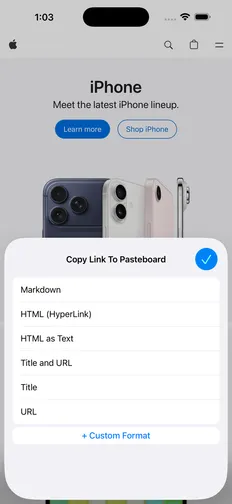
Markdown, HyperLink (rich text), HTML with charset, HTML as text, title and URL, title only, and URL only.
- 02
Custom Format Templates
Build your own formats with ${title} and ${url} placeholders — for Slack, Jira, LaTeX, BBCode, spreadsheets, and more.
- 03
Smart Link Text
Select text on the page before copying, and your selection becomes the link title. Works with every format, including custom templates.
- 04
Keyboard Shortcuts on iPad
With an external keyboard, ⌃⇧M copies Markdown, ⌃⇧H copies a rich text link, and ⌃⇧U copies the URL — instantly.
- 05
Right in Safari
Tap the extension icon in Safari's address bar to see every format, built-in and custom, in one compact popup.
- 06
Privacy First
No data collection, no tracking, no analytics, no accounts, and no network requests. The pages you copy are never stored or sent anywhere.
Works great with
- GitHub
- Obsidian
- Notion
- Slack
- Jira
- Confluence
- WordPress
- Google Docs
- Apple Notes
Copy once, paste perfectly.
Free on iPhone, iPad, and Mac. No ads, no in-app purchases.